 Langrit
How to make ChatGPT correct your Dutch without rewriting it
Ask ChatGPT or Claude to fix your Dutch and you get a new text you did not write. Three prompts for short corrections, the rule behind each fix, and a quiz.

Paste a Dutch paragraph into ChatGPT, ask "can you correct this?", and you get back a clean, fluent text. It reads well. Most of it is no longer yours, and you cannot tell which changes fixed a real mistake and which were the model's taste. Claude does the same.
For learning you want something else: your own sentences with only the errors fixed, and a short reason for each fix. The reason is the part you learn from.
These three prompts get you that. The screenshots are from ChatGPT. The prompts are plain text, so you can paste them into Claude unchanged.
Prompt 1: correct, don't rewrite
A plain "correct this" invites a rewrite. Say what the tutor has to leave alone.
I am learning Dutch (level A2). Correct the text below.
Rules:
- Keep my sentences and my words. Change only what is wrong.
- Do not improve style. If a sentence is correct but simple, leave it.
- After the corrected text, list every change as: my version → correct version → the rule in one short sentence.

Text:
[paste your text here]
Put your own level in the first line. I tried it with three short sentences:
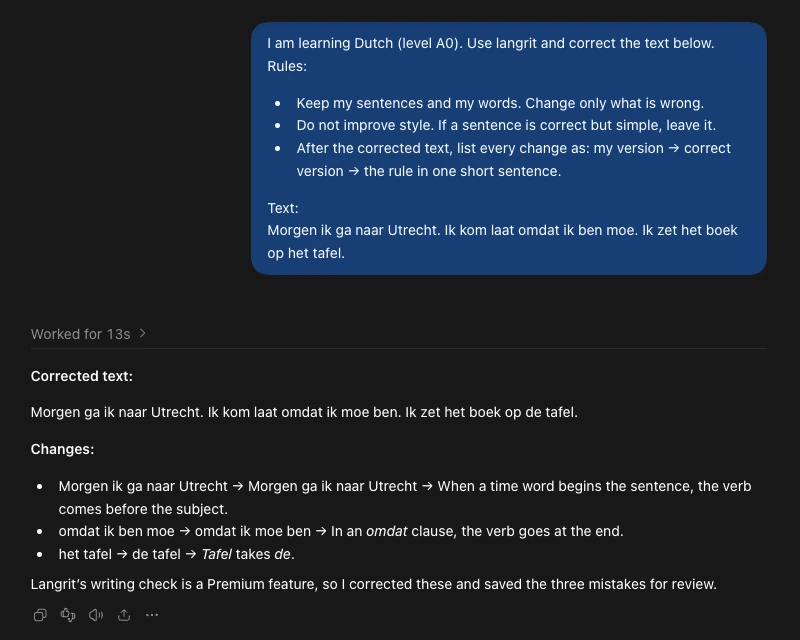
The sentences are still mine. Three things changed, and each change has its rule next to it:
| You wrote | Correct | Rule |
|---|---|---|
| Morgen ik ga naar Utrecht. | Morgen ga ik naar Utrecht. | When a sentence starts with something other than the subject, the verb comes second and the subject moves after it. |
| omdat ik ben moe | omdat ik moe ben | After omdat, dat, als the verb goes to the end. |
| het tafel | de tafel | Tafel is a de-word. Most nouns are. |
The list of changes is what you study. The corrected text is only there so you can check the list against it.
Prompt 2: tell me the type, let me fix it
A mistake you fix yourself stays with you longer than one where you read the answer. This prompt asks for hints only.
Here is my Dutch text. Do not correct it.
For each sentence with a mistake, tell me only the type of mistake (word order, verb form, de/het, spelling, word choice) and underline the area with **bold**.
I will send my corrected version. Then check it and give the answers I still got wrong.

Text:
[paste your text here]
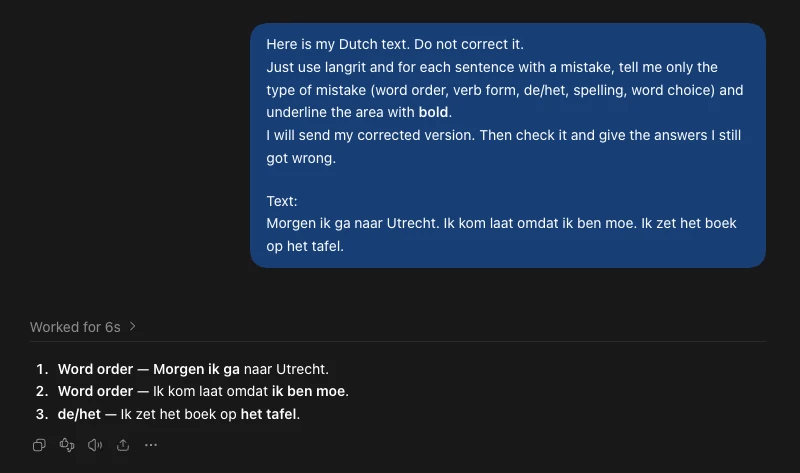
Now you know where to look: two sentences have a word order problem and one has the wrong article. Rewrite them, send your version, and the tutor tells you what is still wrong.
It takes two minutes longer than prompt 1. After a few texts you will see the same two or three types come back every time. Those are the ones to practise.
Prompt 3: quiz me on my own mistakes
Before you close the chat, turn the mistakes into practice.
Make 5 short sentences that test the mistakes I made in this chat. Leave a gap where the mistake was. Ask them one at a time and wait for my answer.
The catch: next week it has forgotten
All three prompts work inside one chat. Open a new chat next week and the tutor may still know that you are learning Dutch. It will not bring back the verb you put in the wrong place after omdat and check that you fixed it. Last week's mistakes come back without anyone noticing. I wrote more about that in why your AI tutor forgets your mistakes.
You can keep a list yourself and paste it at the start of every chat. Or you can connect Langrit, which gives the tutor a memory for your mistakes. The memory is free and setup takes about two minutes. There is a step-by-step page for each app: connect ChatGPT or connect Claude.
Once it is connected, add "use Langrit" to the prompt, as I did in the screenshots. The correction looks the same, with one extra line at the end: the three mistakes were saved for review. Each saved mistake becomes a review card in your Langrit account.
A week later, open a new chat in either app and say "quiz me on my reviews". The tutor asks the cards that are due, one at a time. That is how the verb after omdat comes back next week when you would have forgotten it. The connect guide lists what else you can say.
With or without a memory, keep the rule from prompt 1: your words, only the errors fixed, one reason per fix.